| Phiên bản | Ngày thực hiện | Nội dung | Người thực hiện |
|---|---|---|---|
| 2.2 | 18/11/2025 | Cập nhật và bổ sung thông tin | Lê Thanh Tùng |
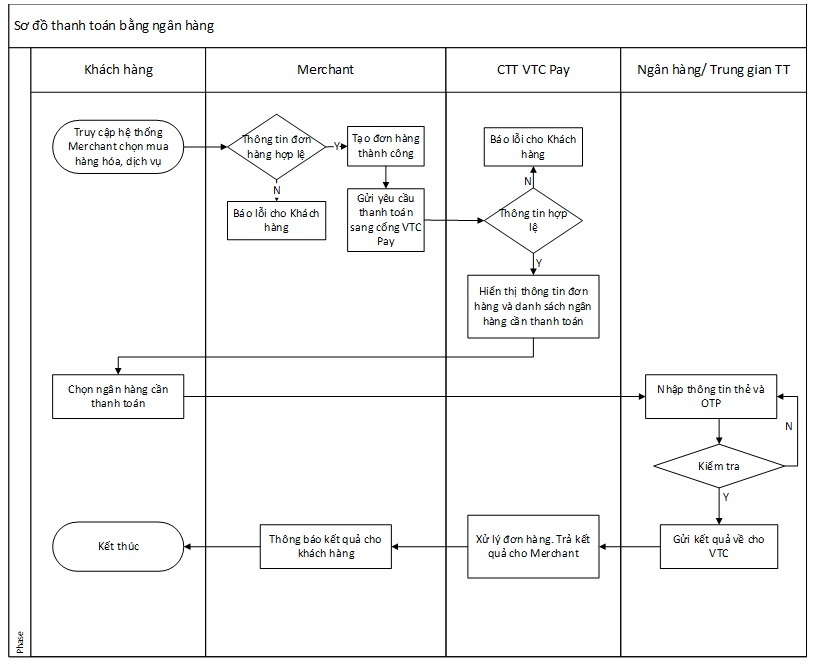
Đây là tài liệu mô tả kết nối thanh toán giữa cổng VTC Pay trong vai trò là đơn vị thanh toán và Merchant Shop (hệ thống của đối tác) trong vai trò là đơn vị bán hàng, sử dụng chức năng thanh toán trực tuyến của VTC Pay qua ví điện tử VTC Pay và tài khoản ngân hàng (internet banking nội địa và quốc tế)
Tài liệu mô tả các chức năng cần thiết mà hệ thống 2 bên cần có cho việc tích hợp, trao đổi thông tin
Tài liệu mô tả luồng dữ liệu qua lại giữa hai hệ thống trong quá trình giao dịch
Quy định các chuẩn trao đổi dữ liệu và các biện pháp đảm bảo an toàn cũng như xác thực nguồn gốc giao dịch
Webiste VTC Pay để vào đăng ký website tích hợp, xem lịch sử giao dịch:
https://alpha-doitac.vtcpay.vn/
Url gửi thông tin thanh toán đơn hàng:
https://alpha.vtcpay.vn/bank-gateway/checkout.html
Tài khoản nhận tiền của Merchant:
Account:  0963465816
Password: Aa@123456
OTP: 123456Website VTC Pay:
https://doitac.vtcpay.vn/
Url gửi thông tin thanh toán đơn hàng:
https://portal.vtcpay.vn/bank-gateway/checkout.html
 Lưu ý: Dữ liệu test và thật là hai dữ liệu riêng biệt, do vậy khi triển khai thật bạn cần:
- Có tài khoản VTC Pay để tạo website tích hợp và dùng làm tài khoản hứng tiền
- Tạo website tích hợp
 Bước 1
Bước 2
Bước 3
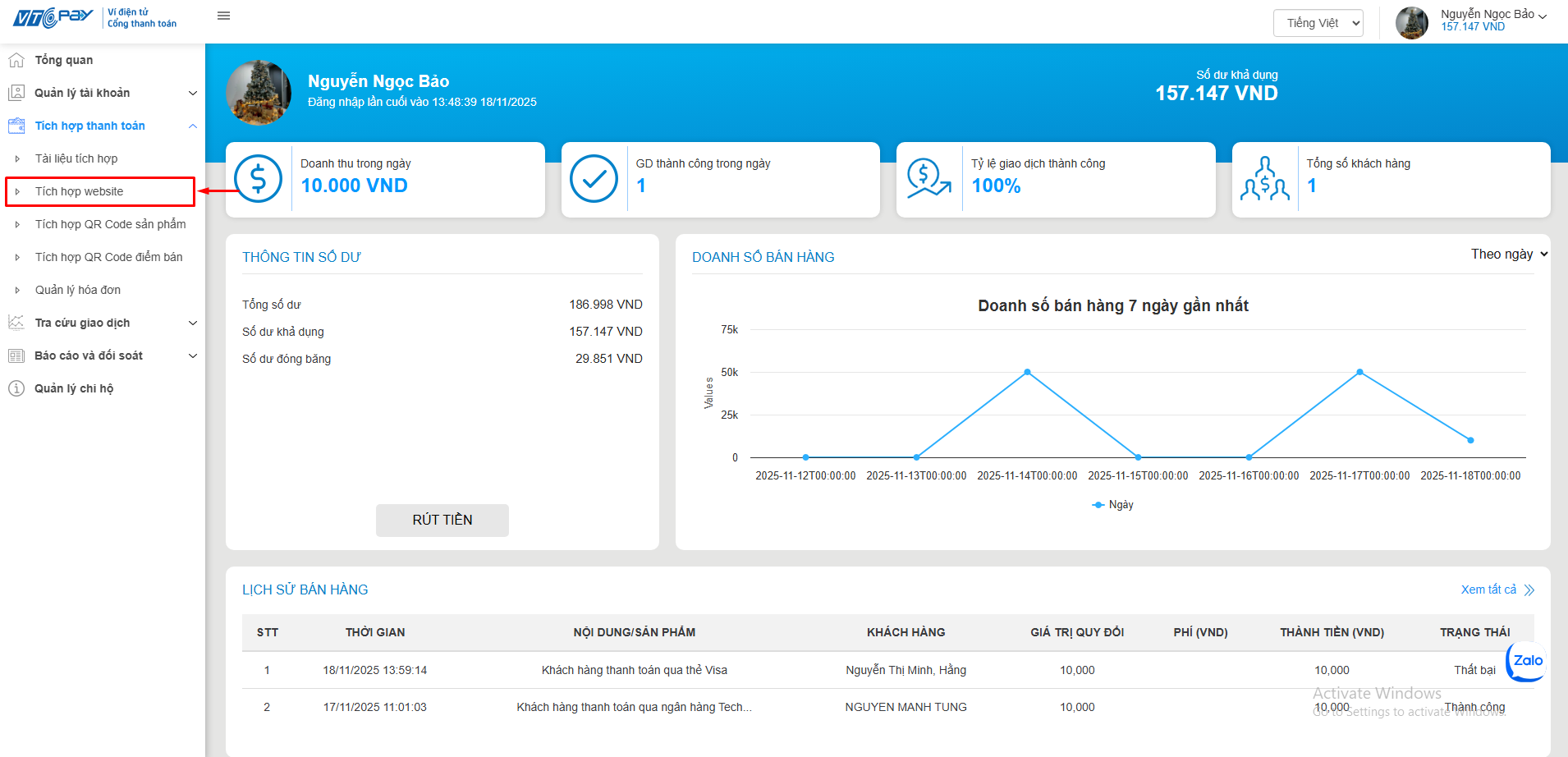
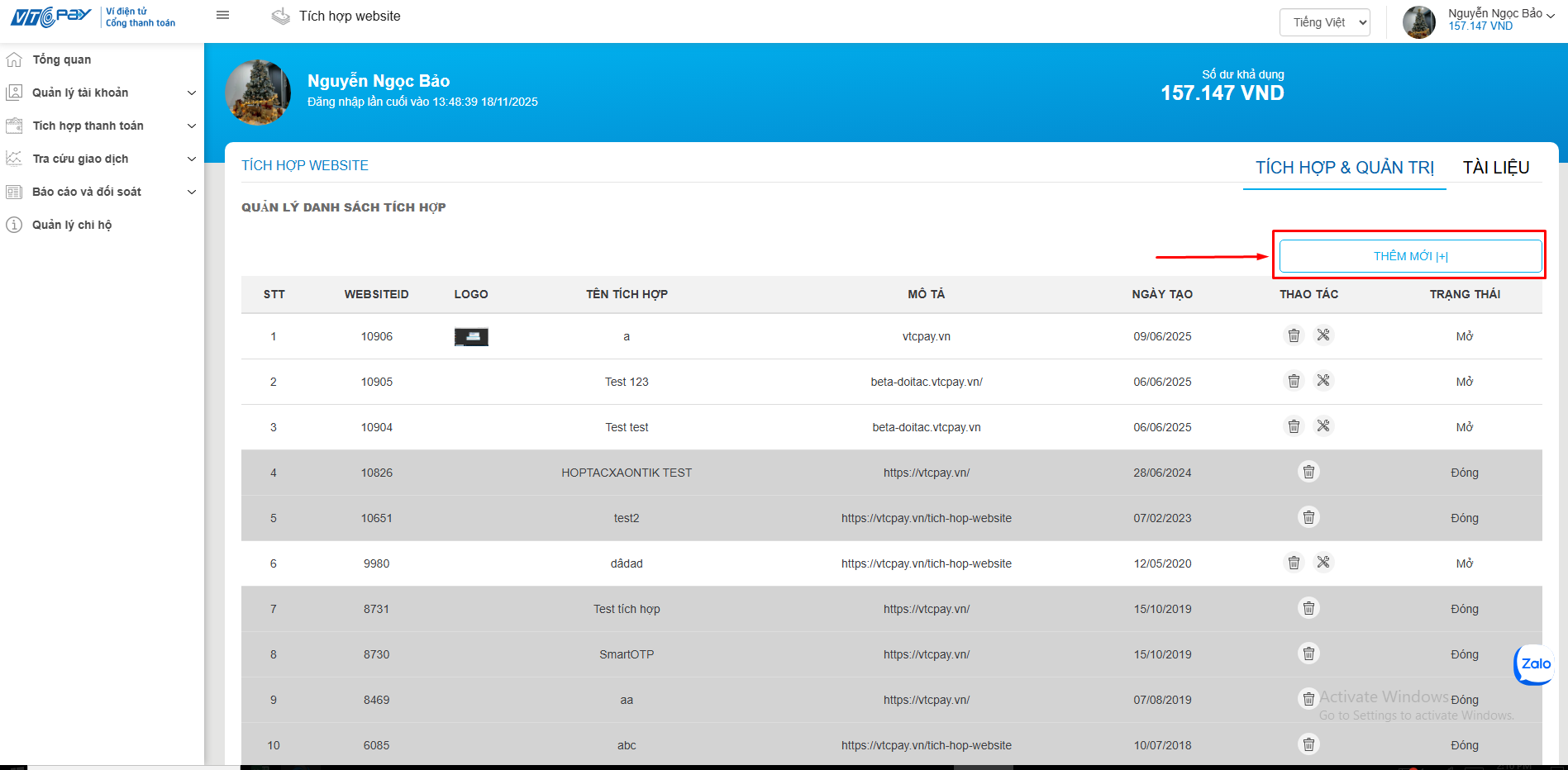
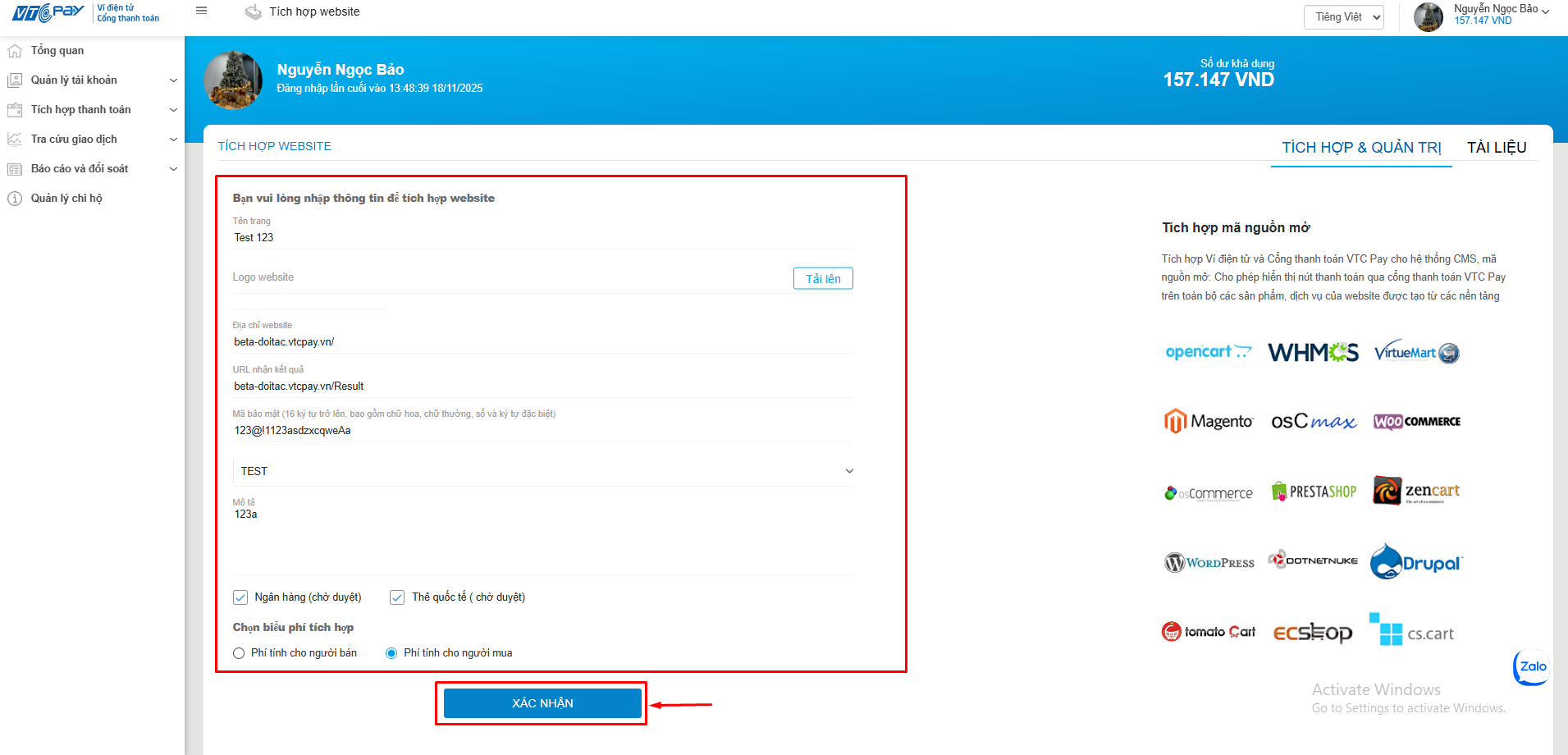
Để có thể tích hợp thanh toán qua cổng thanh toán VTC Pay, Merchant cần đăng ký thông tin tích hợp website. VTC Pay sẽ thực hiện quản lý các website tích hợp của Merchant.
Sau đây là các bước chi tiết để Merchant có thể đăng ký thông tin tích hợp website cho mình:
Bước 1
Bước 2
Bước 3
Lưu ý:
Url nhận kết quả: Là địa chỉ nhận kết quả giao dịch thanh toán đơn hàng từ VTC Pay theo POST. Như khai báo ở trên thì sau khi hoàn thành giao dịch VTC sẽ post kết quả về trang đón của Merchant là: http://www.kidsplaza.vn/Result.html
Nếu không truyền Url Redirect trên đơn hàng, VTC cũng redirect khách hàng về Url nhận kết quả
Mã bí mật: Là thông tin thêm vào khi tạo chữ ký theo chữ ký bằng SHA256. Mã bí mật phải bao gồm số, ký tự hoa, thường và nên có độ dài ít nhất 16 ký tự.
Biểu phí tích hợp: có hai lựa chọn để người bán quyết định ai chịu phí ngân hàng (Người mua hay Merchant phải chịu)
Ví dụ: Một đơn hàng giá trị 100000 VND, thanh toán qua ngân hàng VietComBank, phí ngân hàng là 3000.
Nếu chọn gói phí NH2: Phí tính cho người bán → Khách hàng bị trừ 100000 tại ngân hàng, tài khoản hứng của Merchant sẽ được nhận (100000 – 3000 = 97000)
Nếu chọn phí NH1: Phí tính cho người mua → Khách hàng bị trừ 103000 tại ngân hàng, tài khoản hứng của Merchant được nhận 100000
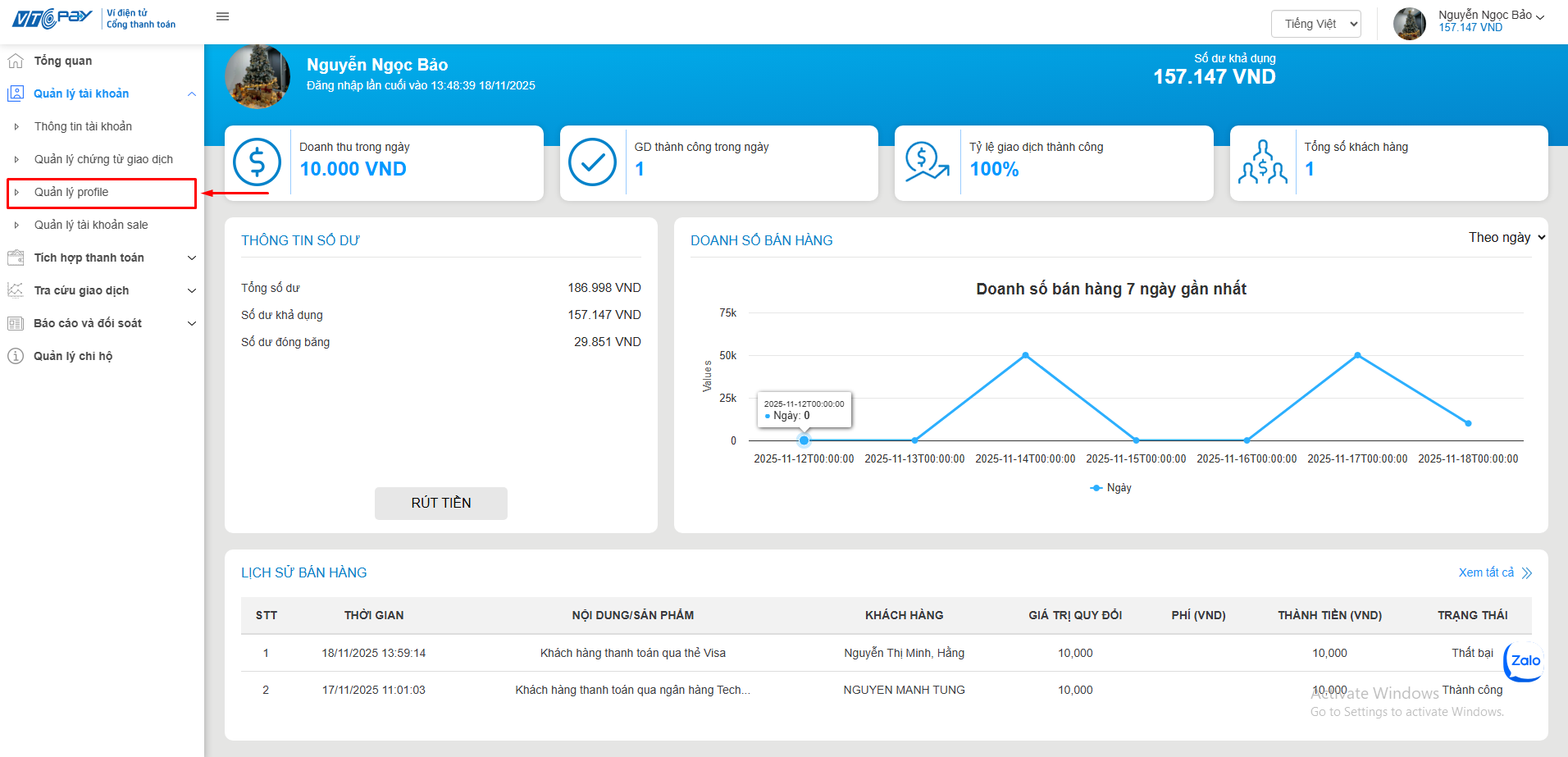
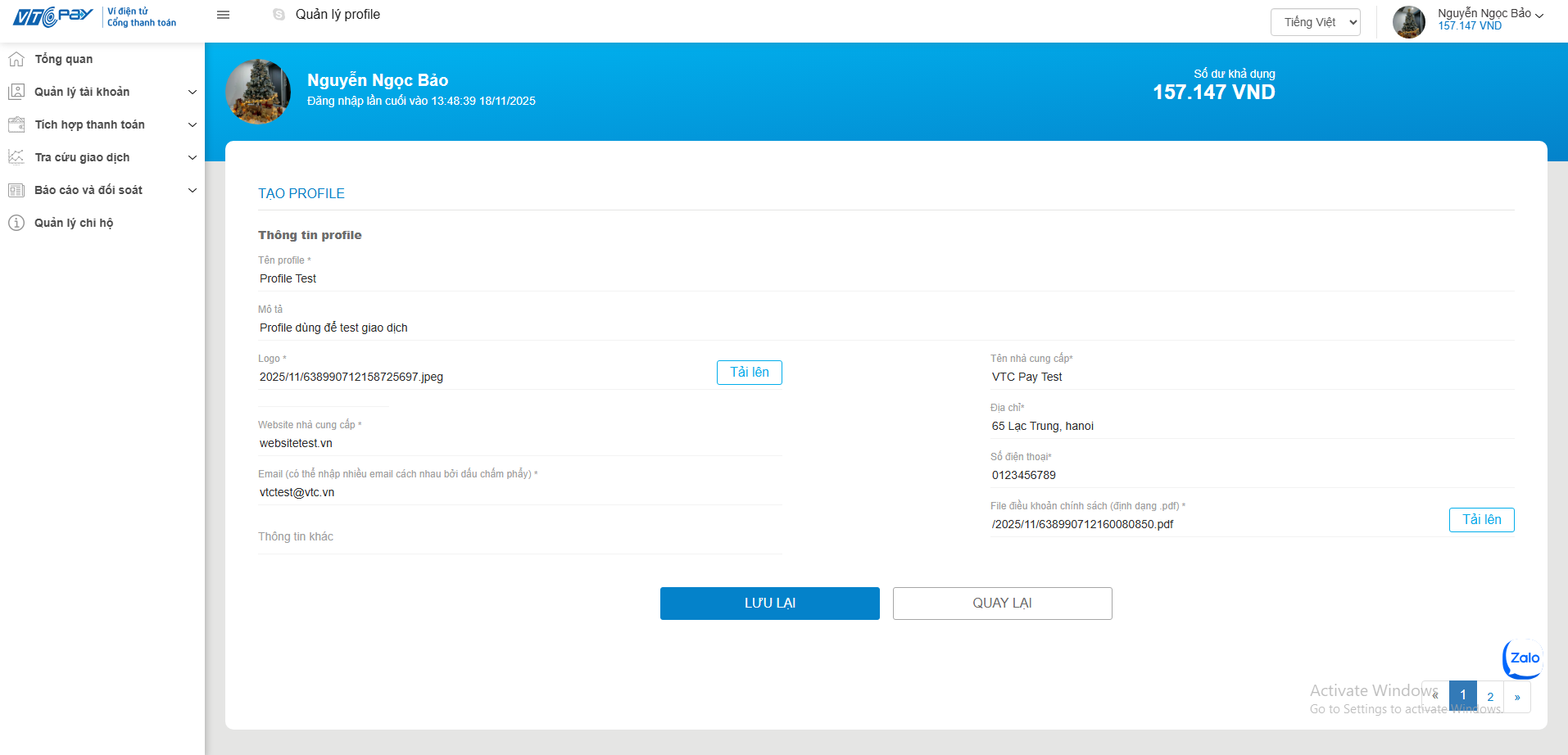
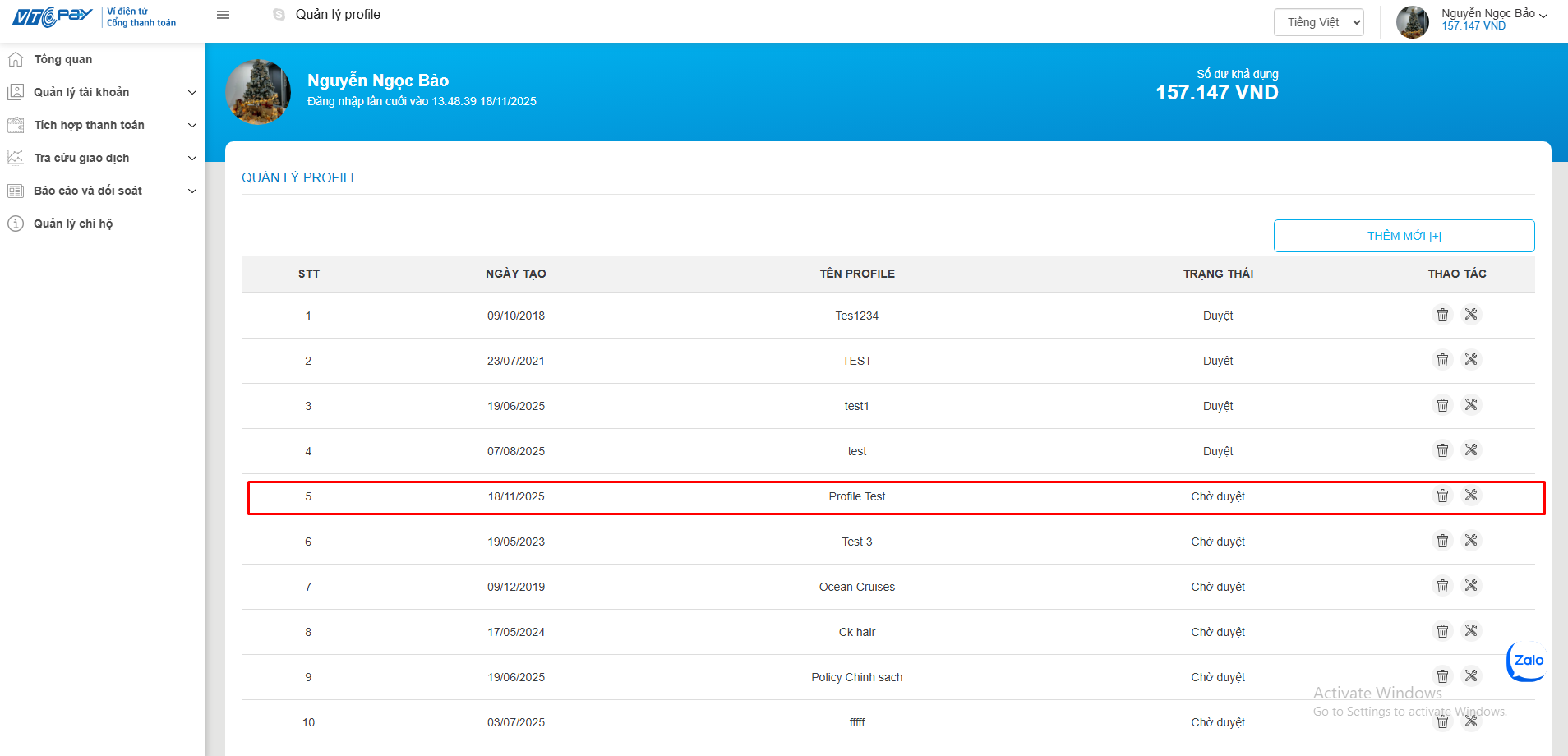
Đối với tài khoản Merchant trên môi trường test được cung cấp, đã có sẵn các profile nên Merchant không cần tạo mới profile cho tài khoản. Tuy nhiên khi tích hợp trên môi trường thật, Merchant cần tạo được profile cho tài khoản trước khi có thể tiến hành tạo và đăng ký tích hợp website . Tham khảo mục HƯỚNG DẪN TẠO PROFILE CHO TÀI KHOẢN MERCHANT!
Tích hợp Ví điện tử và Cổng thanh toán VTC Pay cho hệ thống CMS, mã nguồn mở: Cho phép hiển thị nút thanh toán qua cổng thanh toán VTC Pay trên toàn bộ các sản phẩm, dịch vụ của website được tạo từ các nền tảng sau:















| Tên tham số | Kiểu dữ liệu | Bắt buộc (*) | Mô tả |
|---|---|---|---|
amount | double | Y | Số tiền thanh toán: - Với VNĐ thì để kiểu int - Với USD làm tròn đến hai số thập phân |
bill_to_address | String(100) | N | Địa chỉ khách hàng (Số nhà, đường phố …) |
bill_to_address_city | String(100) | N | Thành phố |
bill_to_email | String(100) | N | Email khách hàng |
bill_to_forename | String(50) | N | Tên (Ex: Hùng) |
bill_to_phone | String(30) | N | Số điện thoại khách hàng |
bill_to_surname | String(50) | N | Họ (Ex: Nguyễn Văn) |
country | String(5) | N | Quốc gia của khách hàng. Khi truyền tham số merchant truyền theo bảng mã quốc gia. Mã quốc gia được liệt kê trong phần phụ lục |
currency | string(5) | Y | Loại tiền tệ muốn thanh toán: - VND - USD |
customer_id | string | N | Mã định danh khách hàng của merchant trong trường hợp merchant muốn tạo liên kết thẻ thanh toán của khách hàng trên cổng thanh toán VTC Pay cho lần thanh toán sau. Chi tiết xem trong phần 5.2.2. Thanh toán và lưu liên kết thẻ |
language | string | N | Ngôn ngữ sẽ hiển thị trên site VTC. Nếu không truyền mặc định là tiếng Việt: vi: Việt Nam en: English |
payment_type | string | N | Loại thanh toán. Tham khảo dánh sách loại thanh toán trong phụ lục 7.3. Danh sách ngân hàng |
postcode | String(50) | N | Mã bưu điện của tỉnh/thành phố của khách hàng |
reference_number | string(30) | Y | Mã tham chiếu của đối tác tích hợp. Mã này phải duy nhất và dùng làm cơ sở hai bên đối soát, kiểm tra |
transaction_type | string | N | sale |
url_return | string | N | Url của Merchant mà VTC sẽ redirect khách hàng sau khi kết thúc giao dịch. Nếu không truyền thì sẽ lấy url khi đăng ký tạo website |
website_id | int | Y | Mã websiteid đối tác tạo trên hệ thống VTC |
signature | string | Y | Chữ ký, SHA (256). Text để tạo chữ ký bao gồm các tham số truyền trên Url và SecretKey. Các trường sắp xếp theo trật tự alphabe ngăn nhau bởi ký tự “|”, Ví dụ: Trường hợp request có bốn tham số amount, currency, reference_number, website_id thì: plaintext = string.Format("{0}|{1}|{2}|{3}|{4}", amount, currency, reference_number, website_id, Security_Key); |
state | String(5) | N | Bang của khách hàng. Khi truyền tham số merchant truyền theo bảng mã bang. Mã bang được liệt kê trong phần phụ lục |
(*). Các tham số có trường Bắt buộc là:
Y : Phải truyền giá trị tham số này trên url
N : Có thể truyền null, empty hoặc không cần truyền trên url
Trường signature: Nếu truyền đủ hết các tham số thì text để tạo chữ ký sẽ như sau là giá trị các tham số và secreKey xếp lần lượt như sau:
amount|bill_to_address|bill_to_address_city|bill_to_email|bill_to_forename|bill_to_phone|bill_to_surname|country|currency|customer_id|language|payment_type|postcode|reference_number|transaction_type|url_return|website_id|SecurityCode|state
amount|bill_to_address|bill_to_email|bill_to_forename|bill_to_phone|bill_to_surname|currency|customer_id|language|payment_type|reference_number|website_id|SecurityCode
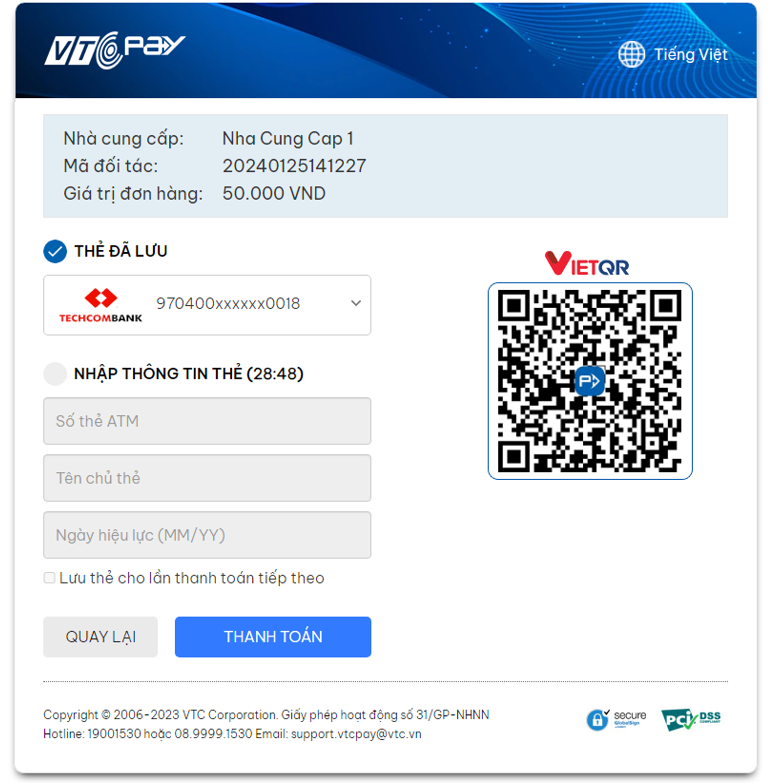
Trong trường hơp merchant có truyền thêm mã định danh khách hàng (customer_id), khi khách hàng thực hiện thanh toán trên cổng thanh toán VTC lần đầu sẽ có thể chọn lưu lại liên kết thẻ để thanh toán cho các lần sau. Kể từ lần thanh toán thứ 2, khách hàng không cần nhập lại thông tin thẻ mà chỉ cần xác thực OTP để hoàn tất thanh toán
- Giao diện thanh toán lần đầu:
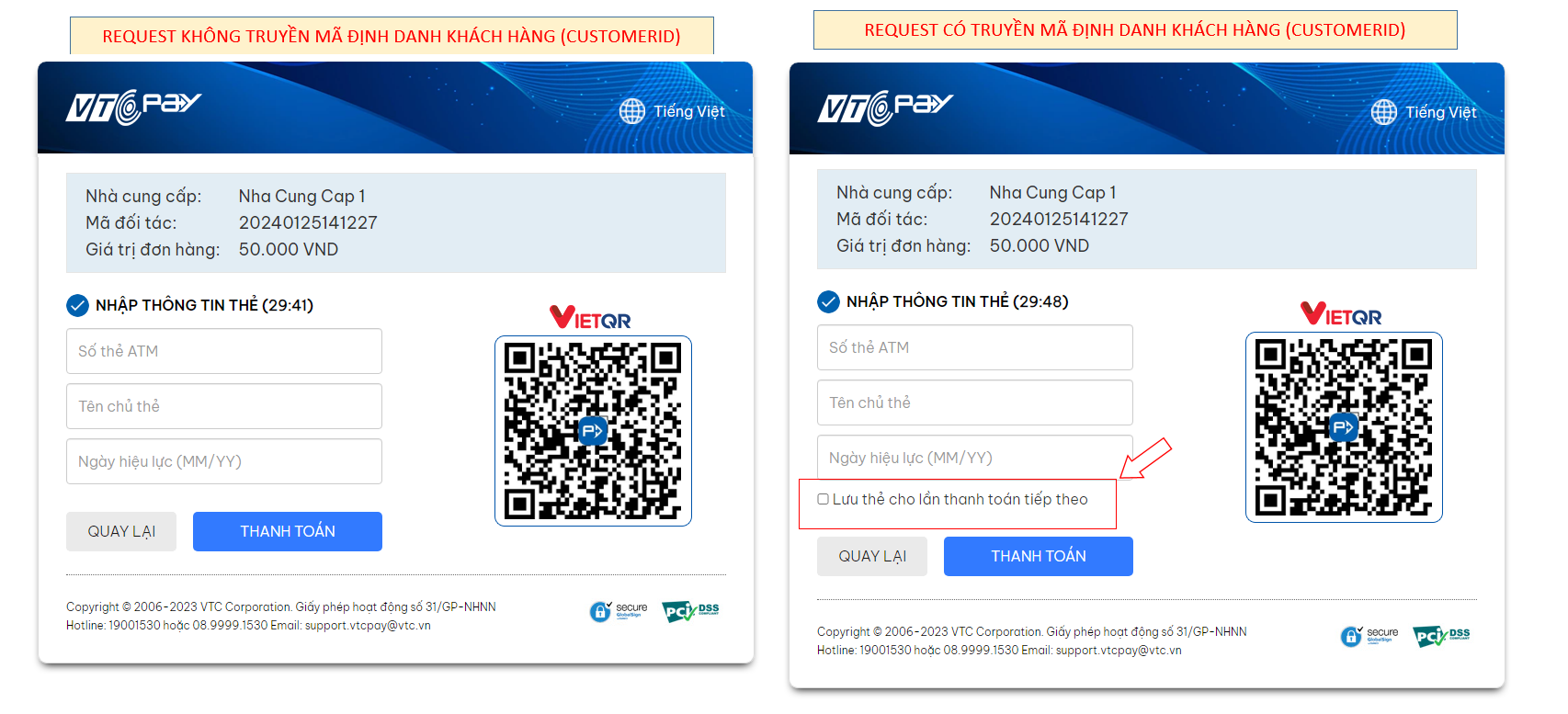
- Giao diện thanh toán kể từ lần thứ 2 khi có mã định danh khách hàng:
HTTP POST là hình thức giao tiếp Server to Server. Dữ liệu sẽ được post từ server VTC Pay tới trang đón của Merchant, là trang khai báo khi tạo website tích hợp. VTC luôn post kết quả giao dịch về trang đón này. Với cách nhận kết quả qua phương thức POST này:
⇒Giúp Merchant luôn nhận được kết quả, hạn chế được tình trạng không nhận được kết quả trong trường hợp sử dụng HTTP Get do khách hàng tắt trình duyệt khi đang giao dịch, vấn đề truyền internet của khách hàng
⇒Giúp Merchant nhận được kết quả cuối cùng với các giao dịch Review, cần duyệt lại khi quản trị của VTC Pay duyệt giao dịch.
⇒ Giúp Merchant so sánh kết quả nhận được qua phương thức GET được trình bày ở phần sau nhằm hạn chế rủi ro
Các tham số kết quả thanh toán đơn hàng VTC Pay trả về trang đón tại hệ thống Merchant
| Trường | Kiểu | Bắt buộc | Mô tả |
|---|---|---|---|
data |
string |
Y | amount|message|payment_type|reference_number| status|trans_ref_no|website_id |
signature |
string |
Y |
Mã hóa SHA256 (UTF8 Encoding) các trường theo format như sau: amount|message|payment_type|reference_number|
status|trans_ref_no|website_id|secret_key secret_key: Chính là mã bí mật bạn nhập khi tạo website |
Chú ý: Khi nhận được kết quả trả về, merchant phải kiểm tra lại số tiền trả về có khớp với số tiền đã truyền lên không. Nếu không khớp thì kết quả trả về không hợp lệ, cần phối hợp với VTC để check lại
Sau khi thanh toán xong, VTC Pay sẽ redirect khách hàng về trang đón của Merchant, đồng thời trả kết quả thanh toán cho Merchant qua các tham số trên Url.
Chi tiết các tham số trả về:
| Trường | Kiểu | Bắt buộc | Mô tả |
|---|---|---|---|
amount |
int |
Y | Giá trị đơn hàng, là số tiền của đơn hàng tại hệ thống Merchant |
message |
string |
N | Thông tin bổ xung |
payment_type |
string |
N | Hình thức thanh toán khách hàng thực hiện giao dịch |
reference_number |
string(50) |
Y | Mã đơn hàng Merchant gửi lên |
status |
int |
Y | Xem phụ lục |
trans_ref_no |
|
Mã tham chiếu VTC | |
website_id |
int |
Y | Mã của website đăng ký trên VTC Pay, xem trong phần quản lý tích hợp website trong VTC Pay |
signature |
string |
Y |
Mã hóa SHA256 (UTF8 Encoding) các trường theo
alphabet, rồi cộng thêm secret_key ở cuối. Lần lượt
như sau:
Amount|message|paymentType|reference_number|
status|trans_ref_no|website_id|secret_key secret_key: Chính là mã bí mật bạn nhập khi tạo website |
Chú ý: Khi nhận được kết quả trả về, merchant phải kiểm tra lại số tiền trả về có khớp với số tiền đã truyền lên không. Nếu không khớp thì kết quả trả về không hợp lệ, cần phối hợp với VTC để check lại
-Thông tin API: Tra cứu lịch sử bán hàng
 Alpha test:  https://alpha.vtcpay.vn/merchantapis-public/v1.0/GetSaleHistory
 Live:  https://api.vtcpay.vn/merchantapis-public/v1.0/GetSaleHistory
 Key sign:  1!2@3#4$5%
 Sign:  MD5
 Phương thức:  POST
- Request Data:
 RevceiverAccount:  Tài khoản ví
 intergratedID:  ID tích hợp AppID hoặc WebsiteID
 merchantType:  WEBSITE hoặc APP
 fromDate:  Ngày bắt đầu lấy lịch sử (2017-01-01)
 toDate:  Ngày kết thúc lấy lịch sử (2017-11-01)
sign: MD5(keysign + RevceiverAccount + intergratedID + merchantType + fromDate + toDate + mã bảo mật web/app) ResponseCode = 1: Lấy lịch sử thành công
ResponseCode != 1: Lấy lịch sử không thành công
ResponseCode = -50: Tài khoản không tồn tại
ResponseCode = -1002: Sai chữ ký
ResponseCode = -601/-602: Thông tin tích hợp không đúng
ResponseCode = -603: Thời gian không hợp lệ
ResponseCode = -604: Tối đa 31 ngày
ResponseCode = -605: Website không tồn tại với tài khoản
OrderStatus = 1 Đơn hàng thành công
OrderStatus = 2 Đơn hàng thất bại
OrderStatus = 3 Đơn hàng nghi vấn chờ duyệt
-Thông tin API: Tra cứu chi tiết giao dịch
 Alpha test:  https://alpha.vtcpay.vn/merchantapis-public/v1.0/CheckOrderStatus
 Live:  https://api.vtcpay.vn/merchantapis-public/v1.0/CheckOrderStatus
 Key sign:  1!2@3#4$5%
 Sign:  MD5
 Phương thức:  POST
- Request Data:
 RevceiverAccount:  Tài khoản ví
 intergratedID:  ID tích hợp AppID hoặc WebsiteID
 merchantType:  WEBSITE hoặc APP
sign: MD5(keysign + RevceiverAccount + intergratedID + merchantType + mã bảo mật web/app) ResponseCode = 1: Thành công
ResponseCode != 1: Không thành công
ResponseCode = -50: Tài khoản không tồn tại
ResponseCode = -1002: Sai chữ ký
ResponseCode = -600/-601/-602: Thông tin tích hợp không đúng
ResponseCode = -603: Danh sách mã đơn hàng merchant rỗng
ResponseCode = -604: App không tồn tại với tài khoản
ResponseCode = -605: Website không tồn tại với tài khoản
ResponseCode = -701/-703: Đơn hàng không tồn tại
ResponseCode = -705: Không tìm thấy đơn hàng của Merchant
Status = 1: Thành công
Status = 2: Thất bại
Status = 3: Nghi vấn
Status = 4: Hoàn tiền
Status = 5: Chờ duyệt hoàn tiền
Status = 6: Hủy yêu cầu hoàn tiền
Status <= 0: Mã đối tác không hợp lệ
-Thông tin API: Gửi yêu cầu hoàn tiền
 Alpha test:  https://alpha.vtcpay.vn/merchantapis-public/v1.0/RefundOrder
 Live:  https://api.vtcpay.vn/merchantapis-public/v1.0/RefundOrder
 Key sign:  1!2@3#4$5%
 Sign:  MD5
 Phương thức:  POST
- Request Data:
 RevceiverAccount:  Tài khoản ví
 intergratedID:  ID tích hợp AppID hoặc WebsiteID
 merchantType:  WEBSITE hoặc APP
sign: MD5(keysign + RevceiverAccount + intergratedID + merchantType + mã bảo mật web/app) ResponseCode = 100: Thành công, đã hoàn tiền
ResponseCode = 10: Yêu cầu hoàn tiền đã được gửi thành công, cần phê duyệt thủ công
ResponseCode = 1: Gửi yêu cầu hoàn thành công
ResponseCode = -1: Gửi yêu cầu hoàn thất bại
ResponseCode = -2: Đã gửi yêu cầu hoàn, vui lòng chờ quản trị viên xử lý
ResponseCode = -3: Đơn hàng đã được hoàn toàn bộ, không thể gửi thêm yêu cầu hoàn
ResponseCode = -103: Số tiền hoàn vượt quá giá trị đơn hàng
ResponseCode = -101/-102/-104/-1001: Gửi yêu cầu hoàn tiền không thành công. Vui lòng thử lại
ResponseCode = -99: Hệ thống bận, vui lòng thử lại sau
ResponseCode = -50: Tài khoản không tồn tại
ResponseCode = -1002: Sai chữ ký
ResponseCode = -600/-601/-602: Thông tin tích hợp không đúng
ResponseCode = -603: Danh sách mã đơn hàng merchant rỗng
ResponseCode = -604: App không tồn tại với tài khoản
ResponseCode = -605: Website không tồn tại với tài khoản
ResponseCode = -700: Thông tin hoàn tiền không hợp lệ
ResponseCode = -701/-703: Đơn hàng không tồn tại
ResponseCode = -704: Số tiền hoàn không hợp lệ
ResponseCode = -705: Không tìm thấy đơn hàng của Merchant
ResponseCode <= 0: Lỗi hệ thống
Các tham số kết quả thanh toán đơn hàng VTC Pay trả về trang đón tại hệ thống Merchant
| Trường | Kiểu | Bắt buộc | Mô tả |
|---|---|---|---|
orderID |
long |
Y | Mã đơn hàng VTC trả về |
ordercode |
string |
Y | Mã đối tác (Mã đơn hàng Merchant gửi lên) |
partnerRefTransID |
string |
Y | Mã đối tác (Mã đơn hàng Merchant gửi lên) |
transactionID |
long |
Y | Mã giao dịch VTC trả về |
- Tài khoản VTC Pay:
Account:  0357758300
Password: Abcd1234
OTP: 123456
- Thẻ Visa test thanh toán qua thẻ quốc tế:
Số thẻ: 4111 1111 1111 1111
Zip/Postal Code:  123
CardType:  Visa
CVN:  123
Exprition Date:  01/2030
Các thông tin còn lại:Nhập bất kỳ, chỉ cần đúng định dạng
- Thẻ test thanh toán qua ngân hàng nội địa Techcombank:
Số thẻ: 9704 0000 0000 0018
Tên chủ thẻ:  NGUYEN VAN A
OTP:  otp
Ngày mở thẻ: 03/07 (MM/YY) | Status | Mean | Ghi chú |
|---|---|---|
0 |
|
Giao dịch ở trạng thái khởi tạo |
1 |
SUCCESS |
Giao dịch thành công |
7 |
REVIEW |
Tài khoản thanh toán của khách hàng đã bị trừ tiền nhưng tài khoản của Merchant chưa được cộng tiền. Bộ phận quản trị thanh toán của VTC sẽ duyệt để quyết định giao dịch thành công hay thất bại |
-1 |
FAIL |
Giao dịch hết thời hạn thanh toán tại VTC hoặc tại đối tác thanh toán; khách hàng không thực hiện giao dịch |
-9 |
FAIL |
Khách hàng tự hủy giao dịch |
-3 |
FAIL |
Quản trị VTC hủy giao dịch |
-4 |
FAIL |
Thẻ/Tài khoản không đủ điều kiện giao dịch (Không tìm thấy thông tin thẻ/Tài khoản, thẻ/tài khoản đang bị khóa hoặc không hợp lệ, thanh toán không khả dụng, hoặc kết nối đến hệ thống của nhà phát hành thẻ bị gián đoạn) |
-5 |
FAIL |
Số dư tài khoản khách hàng (Ví VTC Pay, tài khoản ngân hàng) không đủ để thực hiện giao dịch |
-6 |
FAIL |
Lỗi kỹ thuật phát sinh từ hệ thống (VTC, tổ chức cung cấp giải pháp thanh toán) hoặc lỗi do tích hợp không hợp lệ |
-7 |
FAIL |
Khách hàng nhập sai thông tin thanh toán (Sai thông tin tài khoản; Sai OTP của VTC hoặc của đối tác thanh toán; Sai xác minh 3DS,...) |
-8 |
FAIL |
Giao dịch thất bại do số tiền thanh toán vượt quá hạn mức thanh toán của người dùng |
-22 |
FAIL |
Số tiền thanh toán đơn hàng quá nhỏ |
-24 |
FAIL |
Đơn vị tiền tệ hoặc định dạng số tiền thanh toán đơn hàng không hợp lệ |
-25 |
FAIL |
Tài khoản VTC Pay nhận tiền của Merchant không tồn tại. |
-28 |
FAIL |
Thiếu tham số bắt buộc phải có trong một đơn hàng thanh toán online |
-29 |
FAIL |
Tham số request không hợp lệ |
-21 |
CHECK |
Trùng mã giao dịch, Có thể do xử lý duplicate không tốt nên mạng chậm hoặc khách hàng nhấn F5 bị, hoặc cơ chế sinh mã GD của đối tác không tốt nên sinh bị trùng, đối tác cần kiểm tra lại để biết kết quả cuối cùng của giao dịch này |
-23 |
CHECK |
WebsiteID không tồn tại |
-99 |
CHECK |
Lỗi chưa rõ nguyên nhân và chưa biết trạng thái giao dịch. Cần kiểm tra để biết giao dịch thành công hay thất bại |
| Mã ngân hàng | Tên ngân hàng |
|---|---|
VTCPAY |
Ví điện tử VTC Pay |
BANKTRANSFERVIRTUAL |
Quét mã VietQR |
InternationalCard |
Thanh toán qua thẻ quốc tế (Visa| Master| JCB) |
DomesticBank |
Hiển thị danh sách tất cả các ngân hàng nội địa |
Vietcombank |
Ngân hàng Ngoại Thương Việt Nam |
Techcombank |
Ngân hàng Kỹ thương Việt Nam |
MB |
Ngân hàng Quân Đội MB |
Vietinbank |
Ngân hàng Công thương Việt Nam Vietinbank |
Agribank |
Agribank - Ngân hàng Nông nghiệp & Phát triển Nông thôn |
DongABank |
Ngân hàng Đông Á |
Oceanbank |
Ngân hàng Đại Dương Ocean Bank |
BIDV |
Ngân hàng Đầu tư và Phát triển Việt Nam BIDV |
SHB |
Ngân hàng Sài Gòn – Hà Nội SHB |
VIB |
Ngân hàng Quốc tế VIB |
MaritimeBank |
Ngân hàng Hàng Hải Việt Nam Maritime Bank |
Eximbank |
Ngân hàng Xuất Nhập Khẩu Việt Nam Eximbank |
Master |
Master |
Visa |
Visa |
Jcb |
Jcb |
ACB |
Ngân hàng Á Châu ACB |
HDBank |
Ngân hàng Phát Triển Nhà TP. Hồ Chí Minh HDBank |
NamABank |
Ngân hàng Nam Á Nam A Bank |
SaigonBank |
Ngân hàng Sài Gòn Công Thương SAIGONBANK |
Sacombank |
Ngân hàng Sài Gòn Thương Tín Sacombank |
VietABank |
Ngân hàng Việt Á VietABank |
VPBank |
Ngân hàng Việt Nam Thịnh Vượng VPBank |
TienPhongBank |
Ngân hàng TMCP Tiên Phong TienPhongBank |
SeABank |
Ngân hàng Đông Nam Á SeABank |
PGBank |
Ngân hàng Thương mại Cổ phần Xăng dầu Petrolimex PGBank |
NCB |
Ngân hàng TMCP Quốc dân |
GPBank |
Ngân hàng Thương mại TNHH MTV Dầu khí Toàn Cầu |
BACABANK |
Bac A Bank |
OCB |
Phương Đông |
LienVietPostBank |
Ngân hàng TMCP Bưu Điện Liên Việt |
ABBANK |
Ngân hàng TMCP An Bình |
PVcomBank |
Ngân hàng TMCP Đại Chúng PVcomBank |
BVB |
Ngân hàng TMCP Bảo Việt |
SCBBank |
Ngân hàng TMCP Sai Gon Bank |
KienLongBank |
Ngân hàng TMCP Kiên Long |
VRB |
Ngân hàng Liên doanh Việt - Nga |
PublicBank |
Ngân hàng Public Việt Nam |
MoMo |
Ví điện tử Momo |
ViettelPay |
Viettel Money |
ZaloPay |
Zalo Pay |
VNPAYQR |
VNPAYQR |
VNPTMoney |
VNPT Money |
AppotaPay |
Appota Pay |
ShopeePay |
Shopee Pay |
| Mã quốc gia | Tên quốc gia |
|---|---|
AF | Afghanistan AF |
AX | Aland Islands AX |
AL | Albania AL |
DZ | Algeria DZ |
AS | American Samoa (US) AS |
AD | Andorra AD |
AO | Angola AO |
AI | Anguilla (UK) AI |
AQ | Antarctica AQ |
AG | Antigua and Barbuda AG |
AR | Argentina AR |
AM | Armenia AM |
AW | Aruba AW |
AU | Australia AU |
AT | Austria AT |
AZ | Azerbaijan AZ |
BS | Bahamas BS |
BH | Bahrain BH |
BD | Bangladesh BD |
BB | Barbados BB |
BY | Belarus BY |
BE | Belgium BE |
BZ | Belize BZ |
BJ | Benin BJ |
BM | Bermuda (UK) BM |
BT | Bhutan BT |
BO | Bolivia BO |
BQ | Bonaire, Sint Eustatius and Saba BQ |
BA | Bosnia and Herzegovina BA |
BW | Botswana BW |
BV | Bouvet Island BV |
BR | Brazil BR |
IO | British Indian Ocean Territory IO |
VG | British Virgin Islands (UK) VG |
BN | Brunei Darussalam BN |
BG | Bulgaria BG |
BF | Burkina Faso BF |
BI | Burundi BI |
KH | Cambodia KH |
CM | Cameroon CM |
CA | Canada CA |
CV | Cape Verde CV |
KY | Cayman Islands (UK) KY |
CF | Central African Republic CF |
TD | Chad TD |
CL | Chile CL |
CN | China CN |
CX | Christmas Island (AU) CX |
CC | Cocos (Keeling) Islands (AU) CC |
CO | Colombia CO |
KM | Comoros KM |
CD | Congo, Democratic Republic of the CD |
CG | Congo, Republic of the CG |
CK | Cook Islands (NZ) CK |
CR | Costa Rica CR |
CI | Côte D'Ivoire CI |
HR | Croatia HR |
CU | Cuba CU |
CW | Curaçao CW |
CY | Cyprus CY |
CZ | Czech Republic CZ |
DK | Denmark DK |
DJ | Djibouti DJ |
DM | Dominica DM |
DO | Dominican Republic DO |
EC | Ecuador EC |
EG | Egypt EG |
SV | El Salvador SV |
GQ | Equatorial Guinea GQ |
ER | Eritrea ER |
EE | Estonia EE |
ET | Ethiopia ET |
FK | Falkland Islands (UK) FK |
FO | Faroe Islands (DK) FO |
FJ | Fiji FJ |
FI | Finland FI |
FR | France FR |
GF | French Guiana (FR) GF |
PF | French Polynesia (FR) PF |
TF | French Southern Territories TF |
GA | Gabon GA |
GM | Gambia GM |
GE | Georgia GE |
DE | Germany DE |
GH | Ghana GH |
GI | Gibraltar (UK) GI |
GR | Greece GR |
GL | Greenland (DK) GL |
GD | Grenada GD |
GP | Guadeloupe (FR) GP |
GU | Guam (US) GU |
GT | Guatemala GT |
GG | Guernsey GG |
GN | Guinea GN |
GW | Guinea-Bissau GW |
GY | Guyana GY |
HT | Haiti HT |
HM | Heard Island and McDonald Islands HM |
VA | Holy See (Vatican City) VA |
HN | Honduras HN |
HK | Hong Kong (CN) HK |
HU | Hungary HU |
IS | Iceland IS |
IN | India IN |
ID | Indonesia ID |
IR | Iran IR |
IQ | Iraq IQ |
IE | Ireland IE |
IM | Isle of Man IM |
IL | Israel IL |
IT | Italy IT |
JM | Jamaica JM |
JP | Japan JP |
JE | Jersey JE |
JO | Jordan JO |
KZ | Kazakhstan KZ |
KE | Kenya KE |
KI | Kiribati KI |
KP | Korea, Democratic People's Republic (North) KP |
KR | Korea, Republic of (South) KR |
KW | Kuwait KW |
KG | Kyrgyzstan KG |
LA | Laos LA |
LV | Latvia LV |
LB | Lebanon LB |
LS | Lesotho LS |
LR | Liberia LR |
LY | Libya LY |
LI | Liechtenstein LI |
LT | Lithuania LT |
LU | Luxembourg LU |
MO | Macau (CN) MO |
MK | Macedonia MK |
MG | Madagascar MG |
MW | Malawi MW |
MY | Malaysia MY |
MV | Maldives MV |
ML | Mali ML |
MT | Malta MT |
MH | Marshall Islands MH |
MQ | Martinique (FR) MQ |
MR | Mauritania MR |
MU | Mauritius MU |
YT | Mayotte (FR) YT |
MX | Mexico MX |
FM | Micronesia, Federated States of FM |
MD | Moldova Republic of MD |
MC | Monaco MC |
MN | Mongolia MN |
ME | Montenegro ME |
MS | Montserrat (UK) MS |
MA | Morocco MA |
MZ | Mozambique MZ |
MM | Myanmar MM |
NA | Namibia NA |
NR | Nauru NR |
NP | Nepal NP |
NL | Netherlands NL |
AN | Netherlands Antilles (NL) AN |
NC | New Caledonia (FR) NC |
NZ | New Zealand NZ |
NI | Nicaragua NI |
NE | Niger NE |
NG | Nigeria NG |
NU | Niue NU |
NF | Norfolk Island (AU) NF |
MP | Northern Mariana Islands (US) MP |
NO | Norway NO |
OM | Oman OM |
PK | Pakistan PK |
PW | Palau PW |
PS | Palestinian Territories PS |
PA | Panama PA |
PG | Papua New Guinea PG |
PY | Paraguay PY |
PE | Peru PE |
PH | Philippines PH |
PN | Pitcairn Islands (UK) PN |
PL | Poland PL |
PT | Portugal PT |
PR | Puerto Rico (US) PR |
QA | Qatar QA |
RE | Reunion (FR) RE |
RO | Romania RO |
RU | Russia RU |
RW | Rwanda RW |
BL | Saint Barthelemy BL |
SH | Saint Helena (UK) SH |
KN | Saint Kitts and Nevis KN |
LC | Saint Lucia LC |
MF | Saint Martin (French Part) MF |
PM | Saint Pierre & Miquelon (FR) PM |
VC | Saint Vincent and the Grenadines VC |
WS | Samoa WS |
SM | San Marino SM |
ST | Sao Tome and Principe ST |
SA | Saudi Arabia SA |
SN | Senegal SN |
RS | Serbia RS |
SC | Seychelles SC |
SL | Sierra Leone SL |
SG | Singapore SG |
SX | Sint Maarten (Dutch Part) SX |
SK | Slovakia SK |
SI | Slovenia SI |
SB | Solomon Islands SB |
SO | Somalia SO |
ZA | South Africa ZA |
GS | South Georgia & South Sandwich Islands (UK) GS |
SS | South Sudan SS |
ES | Spain ES |
LK | Sri Lanka LK |
SD | Sudan SD |
SR | Suriname SR |
SJ | Svalbard and Jan Mayen SJ |
SZ | Swaziland SZ |
SE | Sweden SE |
CH | Switzerland CH |
SY | Syria SY |
TW | Taiwan TW |
TJ | Taj ikistan TJ |
TZ | Tanzania TZ |
TH | Thailand TH |
TL | Timor-Leste TL |
TG | Togo TG |
TK | Tokelau TK |
TO | Tonga TO |
TT | Trinidad and Tobago TT |
TN | Tunisia TN |
TR | Turkey TR |
TM | Turkmenistan TM |
TC | Turks and Caicos Islands (UK) TC |
TV | Tuvalu TV |
UG | Uganda UG |
UA | Ukraine UA |
AE | United Arab Emirates AE |
GB | United Kingdom GB |
US | United States US |
UM | United States Minor Outlying Islands UM |
UY | Uruguay UY |
UZ | Uzbekistan UZ |
VU | Vanuatu VU |
VE | Venezuela VE |
VN | Vietnam VN |
VI | Virgin Islands (US) VI |
WF | Wallis and Futuna (FR) WF |
EH | Western Sahara EH |
YE | Yemen YE |
ZM | Zambia ZM |
ZW | Zimbabwe ZW |
| Mã bang | Tên bang |
|---|---|
AL | Alabama |
AK | Alaska |
AS | American Samoa |
AZ | Arizona |
AR | Arkansas |
CA | California |
CO | Colorado |
CT | Connecticut |
DE | Delaware |
DC | District of Columbia |
FM | Federated States of Micronesia |
FL | Florida |
GA | Georgia |
GU | Guam |
HI | Hawaii |
ID | Idaho |
IL | Illinois |
IN | Indiana |
IA | Iowa |
KS | Kansas |
KY | Kentucky |
LA | Louisiana |
ME | Maine |
MH | Marshall Islands |
MD | Maryland |
MA | Massachusetts |
MI | Michigan |
MN | Minnesota |
MS | Mississippi |
MO | Missouri |
MT | Montana |
NE | Nebraska |
NV | Nevada |
NH | New Hampshire |
NJ | New Jersey |
NM | New Mexico |
NY | New York |
NC | North Carolina |
ND | North Dakota |
MP | Northern Mariana Islands |
OH | Ohio |
OK | Oklahoma |
OR | Oregon |
PW | Palau |
PA | Pennsylvania |
PR | Puerto Rico |
RI | Rhode Island |
SC | South Carolina |
SD | South Dakota |
TN | Tennessee |
TX | Texas |
UT | Utah |
VT | Vermont |
VI | Virgin Islands |
VA | Virginia |
WA | Washington |
WV | West Virginia |
WI | Wisconsin |
WY | Wyoming |
AB | Alberta |
BC | British Columbia |
MB | Manitoba |
NB | New Brunswick |
NL | Newfoundland and Labrador |
NT | Northwest Territories |
NS | Nova Scotia |
NU | Nunavut |
ON | Ontario |
PE | Prince Edward Island |
QC | Quebec |
SK | Saskatchewan |
YT | Yukon |